Tesseract
The full technical write-up - the architecture, every decision worth arguing about, and the parts that still aren't verified.
40 min
Reading time, end to end
Jul 2026
Where the work starts
Tesseract: building a personal knowledge system that does its own filing, with every model running on my own hardware
Nikhil Sah - first commit 13 July 2026, release 0.7.0 shipped 6 August 2026
Summary
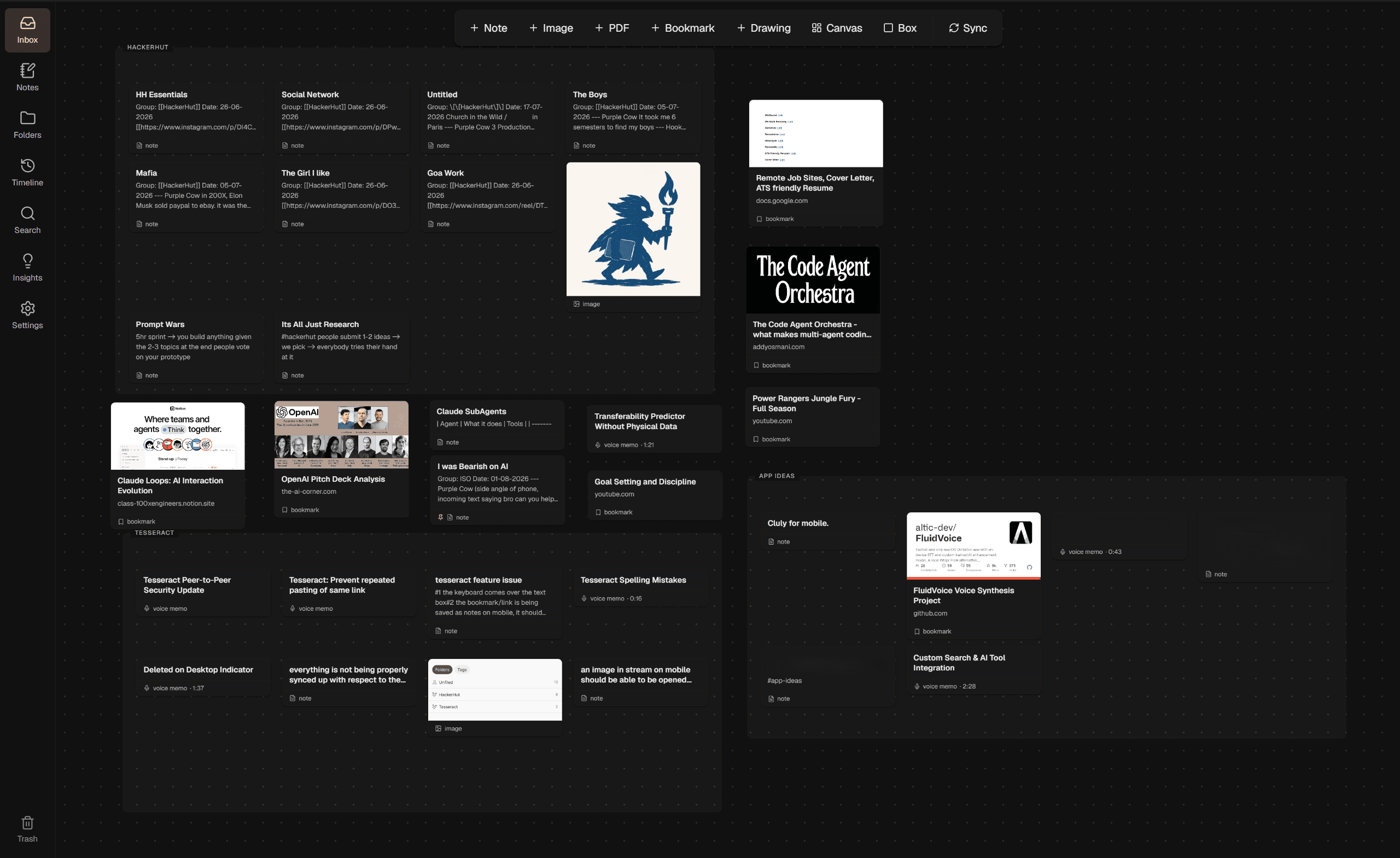
Tesseract is a personal knowledge system for one person. Notes, an infinite canvas, a filing system and notes in one app, where you capture things without worrying about where they go, and press a button later to have them organised for you.
The part I care about most: capture never asks a question. Everything you save from either device(Your Mobile or Desktop) lands in one place called the Inbox. When you press Sync, it reads what's there, groups related things, names the groups, and lays them out on a board. If it gets something wrong you move it by hand, and it never re-files that item again.
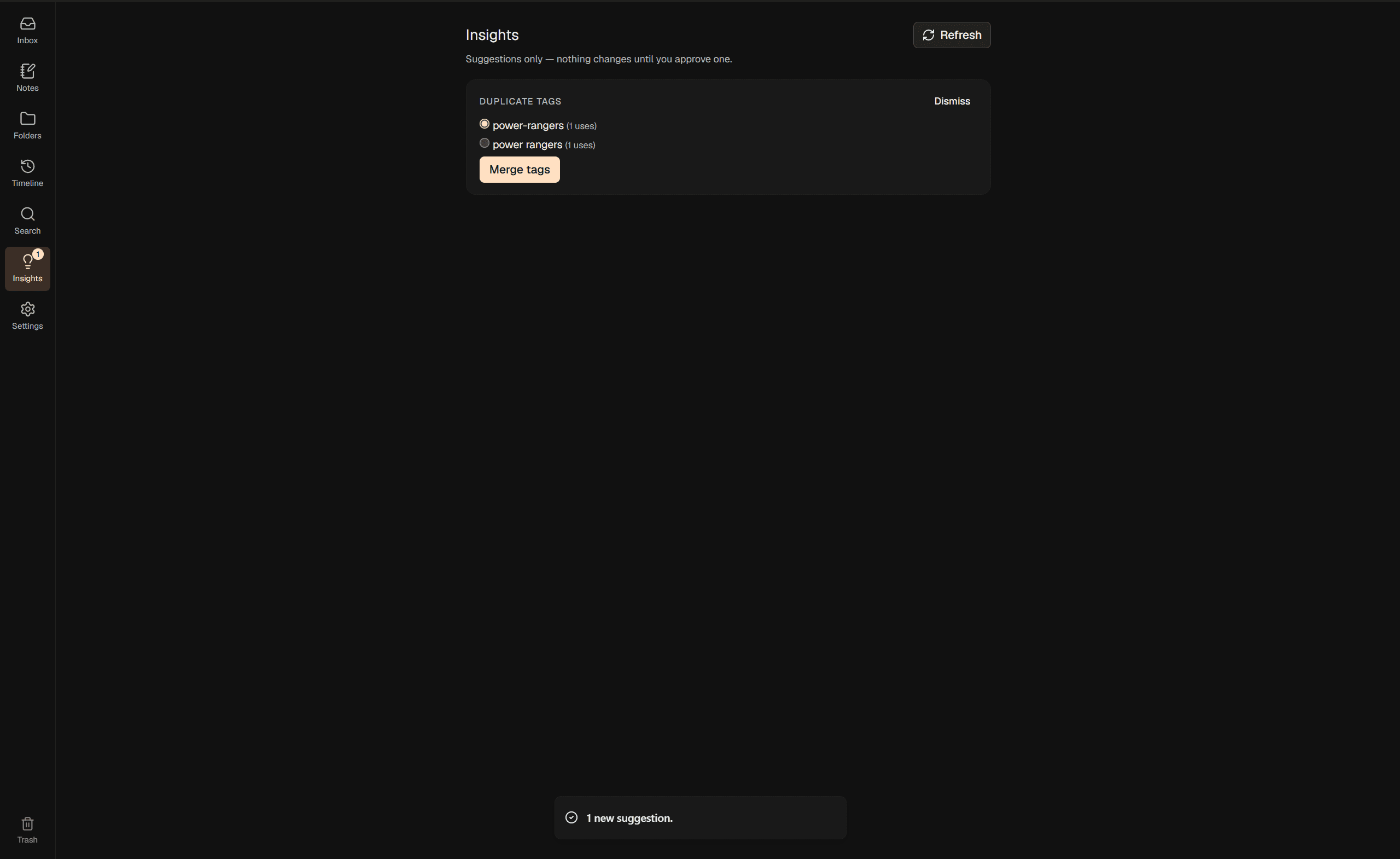
The second part I care about: the AI is split into two halves and only one of them can change anything. Sync is the button, and it is the only process allowed to change what Collection something belongs to or what tags it has. Insights runs in the background and can only write to a suggestions feed that waits for approval. Nothing gets silently reorganised while you're not looking, and that split is what most of the architecture is shaped around.
The third: every model runs on my own hardware. Titles, summaries, tags, image captions, duplicate detection and voice transcription are all local. There is no API key to add and no account to make, and capture works with the Wi-Fi off.
| Platform | Windows desktop (Tauri) + Android (Expo), plus a best-effort Apple Silicon build |
| Backend | None. The desktop app is the server; the phone talks to it directly |
| Storage | SQLite on both devices, sqlite-vec for the vector index |
| On-device AI | EmbeddingGemma-300m · SigLIP2 · Qwen3-8B · SmolVLM2-2.2B · Whisper large-v3-turbo · Qwen3-1.7B |
| Size | ~55.6k lines tracked - 23.1k Rust · 17.5k TSX · 12.2k TS · 1.7k CSS · 1.1k SQL |
| Docs | 31 architectural decision records, a canonical schema, a phased roadmap, an issue log |
| Status | Pre-1.0, daily-driven. Built and running, and honest about what isn't verified |
The repository is private. This document is the public record of how it was built.
01
Why I built it
For years my actual capture system was a WhatsApp chat with myself.
Ideas, links I wanted to come back to, screenshots, voice memos, photos of whiteboards, half-finished thoughts at 2am - all of it went into that one chat, because it was the only thing always one tap away and it never asked me anything. That part worked. The part that didn't was everything after.
Two months later I'd need one of those links, and finding it meant scrolling through hundreds of messages of junk that had piled up on top of it. There's no structure in a chat, no tags, no search that understands what you meant rather than what you typed, and no way to tell an important thing from a meme you forwarded to yourself. So the capture was frictionless and the retrieval was so bad that most of what I saved might as well not have been saved.
The obvious fix is a real notes app, and I tried the real notes apps:
- Obsidian is what I use for my actual notes, and the graph is genuinely good - but every edge in it is one I built by hand, which means it only ever shows the connections I already remembered to make. The ones I'd have wanted it to surface are exactly the ones I didn't know were there.
- Notion wants you to design a database before you're allowed to put anything in it. I've set up that database maybe four times and never once filled it.
- Apple Notes I've never actually used - I don't have an iPhone - but it's the thing I keep pointing at when I describe what a writing surface should feel like. It's simple, it's elegant and it doesn't make you think about it, and that became the bar for the editor here rather than a product I was migrating away from.
All of them share the problem, though, and it's the same problem the WhatsApp chat had from the other direction. They ask you where something goes at the exact moment you're trying to save it.
That's the worst possible time to ask. To file something properly you need to know what else is already in there, and when you're capturing you have one item, no context, and you're usually in the middle of doing something else. So you pick a folder badly, or you make a new one you'll never use again, or you give up and go back to messaging yourself.
So my requirements fell out fairly cleanly:
- Capture asks nothing. One destination for everything, from the laptop or the phone.
- Organising happens later, when I press a button. Not in the background, and not while I'm trying to think.
- Corrections stick. If I move something by hand it stays moved - but correcting one thing shouldn't switch the AI off for it completely.
- Everything runs Locally. Partly for privacy, mostly for simplicity: no API bill deciding what the app is allowed to think about, no accounts, no server to keep alive, and capture that works with no signal.
Everything below is downstream of those four.
02
What the app does
The core loop is one line long:
capture (phone or desktop) → Inbox → press Sync → grouped, named, laid out
                                   ↘ you moved it? → never re-filed
Everything else in the app exists to support that loop.
Capture
There's exactly one destination, the Inbox, and it's a real board rather than a holding pen. A note, a pasted image, a dropped PDF, a link, a voice memo from the phone - all of it arrives there and none of it prompts you for a location.
Sync
The button. It reads the Inbox, works out how similar each unpinned item is to every Collection that already exists, assigns the strong matches, runs clustering over whatever is left to find new groups, names the new ones, and lays out the boxes.
Four ways to look at the same data
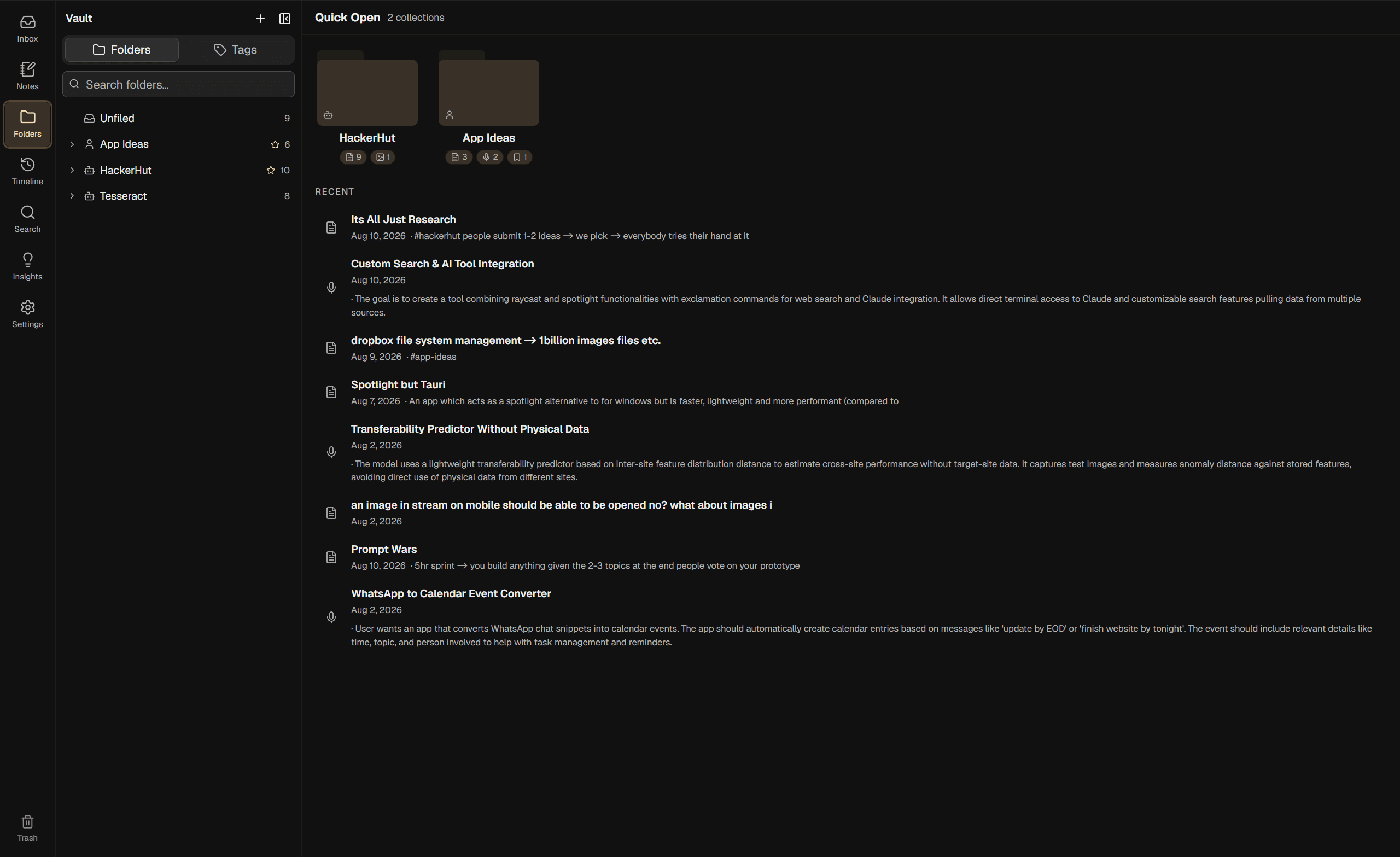
One store, several renderings of it. Change something in one and the others agree immediately, because there's one write path rather than four views each doing their own updates.
| Lens | What it's for |
|---|---|
| Canvas | Spatial. Everything at once, grouped into boxes, movable by hand |
| Folders | Structural. The familiar tree, built from the same Collections the boxes show |
| Timeline | Temporal. Today, Yesterday, This Week, then by year, filterable by tag or type |
| Search | Keyword and meaning together. Results open as a throwaway board you can curate |
A folder and a box on the canvas aren't two features. They're two renderings of one Collection, and that turned out to be the most useful structural decision in the product.
Writing
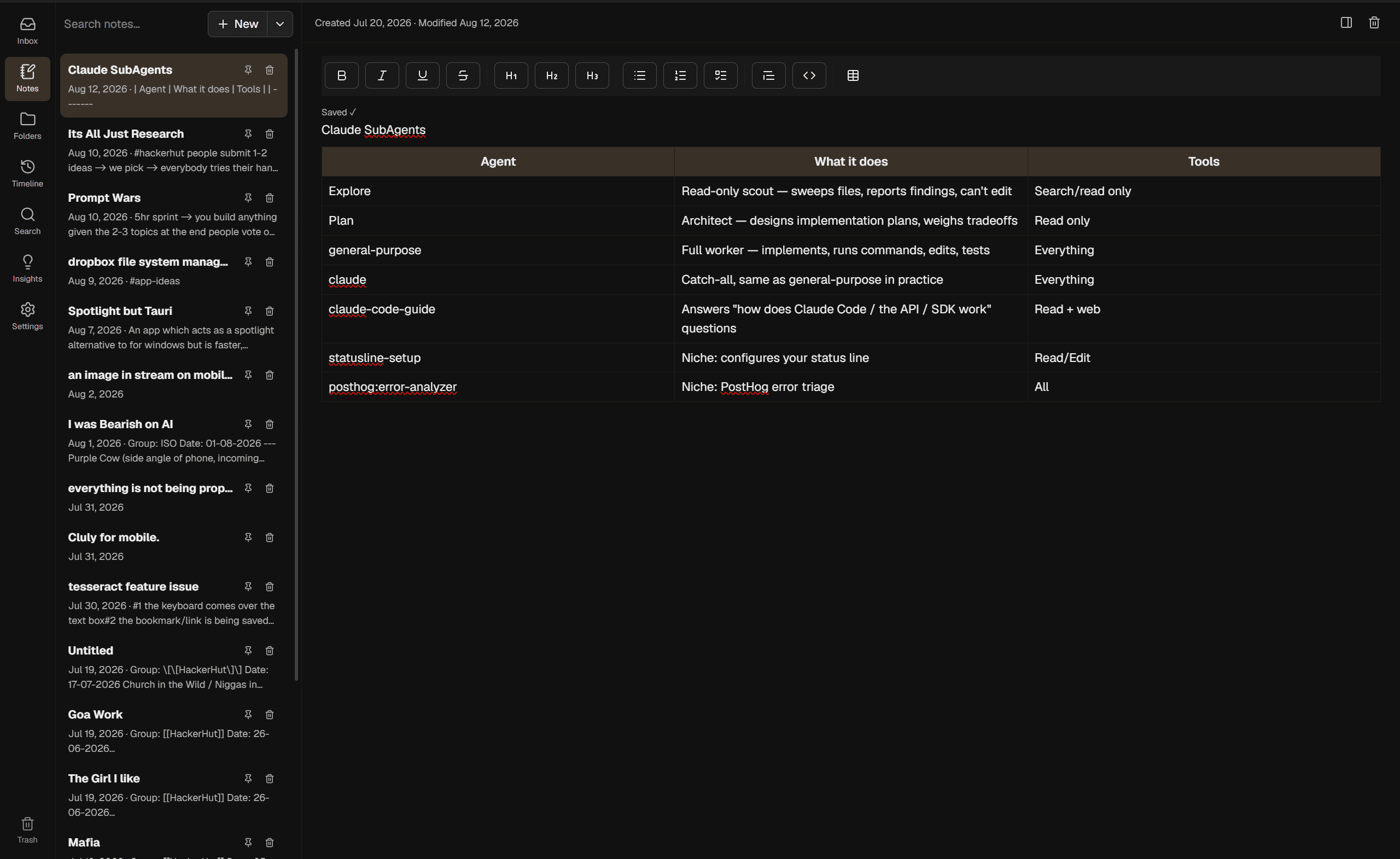
A rich-text editor with headings, lists, tables, inline images and drawings. A note can be stored as markdown instead of rich text if you'd rather its content stayed portable, chosen once when you create it. Wikilinks between notes create real edges in the graph.
If you're coming from Obsidian you can point it at a vault and it imports the lot - notes, tags, folders, wikilinks, image embeds - turning folders into Collections and frontmatter into tags, and showing you what it proposed before anything settles.
Insights
Left running, it looks for duplicates and near-duplicates, spots relationships between items, and flags tags that are really the same tag. Every finding waits in a feed until you approve or dismiss it. It can't change anything on its own.
Search
Keyword search and semantic search merged and re-ranked, with no generative step in the middle. Results render as their own throwaway board with a dashed border, and you can remove the ones you don't want and then file the rest as a real Collection in one action.
The phone
A capture device with a chat-shaped surface called the Capture Stream, which is deliberately the shape of the thing it replaced. Type a thought, snap a photo, paste a link, or hold the mic.
Voice memos are the sharpest version: you record, and the phone transcribes it on-device, drafts a title, and pushes the finished thing across. Nothing is uploaded and you aren't waiting on a service.
A board of your own
Beyond the Inbox you can make a Custom Canvas: a named board that is itself an item sitting on the Inbox. Everything on it stays real and searchable and in the graph, but Sync leaves it completely alone. It's for the things you want arranged your way.
03
Architecture
Four boundaries matter here:
There is no server. The desktop app is the backend. The phone talks to the laptop directly over Tailscale, or over the local network when both are on the same Wi-Fi, and the Vault is a folder on my disk I can back up like any other folder. This started as a budget constraint - I priced a Raspberry Pi 5 as an always-on hub and the RAM tiers I needed were out of stock or too expensive - and then turned out to be the better design anyway.
Sync mutates, Insights suggests. All automatic mutation goes through one button. The background process is structurally incapable of changing anything, because the only place it can write is a suggestions table.
Device, not cloud. Every model in that middle box runs on my machine. The desktop ones
run as llama-server subprocesses over local HTTP, except image embedding, which runs
in-process through ONNX Runtime because there's no llama.cpp path for a standalone
vision-embedding model. The phone's run in-process through React Native bindings.
Retrieval is not generation. Clustering, duplicate detection, assignment and search ranking are embeddings and classical ML with no LLM anywhere near them. Generative models only do things that are actually generative: naming a cluster, writing a title, proposing a tag, captioning an image.
Repo layout
tesseract/
├── apps/
│   ├── desktop/          Tauri + React/TS
│   │   ├── src/          React UI
│   │   └── src-tauri/    Rust core
│   └── mobile/           Expo / React Native
├── packages/shared/      TS types · the API contract · the colour palette
├── scripts/              version bump · token generation · release
├── CONTEXT.md            the vocabulary
├── ROADMAP.md            phased build tracker, v0.1 → v1.0
├── IMPLEMENTATION_PLAN.md  canonical schema + API contract
└── docs/adr/             31 numbered architectural decisions
Bun workspaces, no Nx or Turborepo. One person, two apps, some shared types.
04
The decisions, and what I rejected
This is the section I would want to read about someone else's project.
4.1
Writing the vocabulary before the code
Chose: a CONTEXT.md defining every term in the product exactly once, with a list of
words you're not allowed to use for it, written before any code and treated as canonical
since.
Rejected: letting the vocabulary emerge from the implementation.
Object, Collection, Primary Collection, Pinning, Filing, Placement, Sync, Insights, Vault
- each defined once, each with an avoid-list.
The avoid-lists do the real work. "Sync" is banned as a name for the Obsidian import and "import" is banned for the phone-to-laptop sync, because the shared English word is a coincidence and letting them blur produces a live two-way sync nobody asked for.
I can point at bugs this prevented, but the more convincing evidence is the other direction: the worst bugs in the project all happened in the places where the vocabulary was still fuzzy. §4.9 is four of them, and every one is a word that quietly meant two things.
4.2
Tauri over Electron
Chose: Tauri - React and TypeScript in the OS's own webview, wrapped in a Rust shell. Rejected: Electron, a fully native app, and a plain web app with no shell.
Electron was rejected on RAM and disk. The laptop is already running local LLM inference on top of the UI and 16 GB is a real ceiling, so a bundled Chromium and Node runtime costs more here than it would in a normal app. Obsidian is Electron and it's fine, but Obsidian isn't also holding a 5 GB model in memory.
Fully native was rejected because I'd have had to reimplement an Excalidraw-grade infinite canvas from scratch, which is a lot of avoidable work for one person. A plain web app was rejected because tray integration and external-drive detection are needed for the tray and backup flows regardless.
The Rust core was meant to stay thin - IPC, subprocess management, drive detection, the tray icon - with everything else in TypeScript. It ended up at ~23k lines, which is more than "thin" implies, because the Sync algorithm, the job queue and the HTTP server all live there. That's scope creep I'd defend: those three are the parts where I want a compiler that won't let me forget a case.
4.3
The Inbox isn't Excalidraw
Chose: a custom DOM board for the Inbox. Excalidraw only as the editor inside a drawing object. Rejected: building the Inbox on Excalidraw, which is what the original plan said.
Cards need to be real DOM and React - note previews, image thumbnails, native right-click
- and Excalidraw's canvas element model can't host that. I found this out by building it the wrong way first, which is the usual order of events.
The wrong way also produced the worst bug in the project's history. The delete-detector treated "card missing from the live scene" as a deletion, and a load-refetch race made the missing set look like everything, so it offered to delete the whole board and then hard-deleted real notes. There was no Trash yet. Those notes are gone.
I did look at reusing Excalidraw's lower-level packages for the board. They're published only at unstable hash-pinned prereleases and they're canvas geometry rather than a composable viewport, so there was nothing there to take. The real reuse is the full component as a drawing editor and its SVG export for thumbnails.
4.4
SQLite on both devices
Chose: SQLite - rusqlite on desktop, op-sqlite on mobile - with sqlite-vec for
vectors.
Rejected: Postgres, MySQL, anything with a server process.
Both are built for many concurrent clients, replication and server-side logic, and none of that applies when there's one writer on one device at a time. Running one would mean a background service to keep alive for no benefit, which cuts against the whole laptop-only-no-daemon direction.
The payoff is that both apps share an engine, a schema and query patterns. If this ever became a hosted multi-tenant service a server database becomes the right call at that point, not before.
4.5
No Docker
Chose: spawn llama-server as a plain native subprocess.
Rejected: containerising inference and the background jobs, which an early plan had.
Docker's value is reproducible deployment across machines you don't control and isolating services that scale independently. Neither applies to a native app on my own laptop. And it would hurt the one thing that matters: CUDA passthrough on Windows needs WSL2, Docker Desktop and the NVIDIA container toolkit, which is real friction for no benefit when a native subprocess gets unmediated GPU access.
4.6
Classical ML for retrieval, generative models only where generation is unavoidable
Chose: embeddings, cosine similarity, density-based clustering and hybrid keyword search for everything retrieval-shaped. Generative models only for naming, titling, summarising, tag suggestion and captioning. Rejected: routing classification and duplicate detection through an LLM.
If you ask a language model whether two notes are duplicates you get a plausible sentence. If you ask cosine similarity you get a number you can threshold, tune and test, and reason about when it's wrong. Non-determinism is a price you pay for capability you actually need, and retrieval doesn't need it.
The effect is that the slow, expensive, hard-to-verify component only ever produces things a human reads - a cluster name, a title, a tag - and never a decision the system acts on by itself.
4.7
Best model per task, not one family
Chose: EmbeddingGemma for text vectors, SigLIP2 for image vectors, Qwen3-8B for generation, SmolVLM2 for captioning, Whisper for transcription, Qwen3-1.7B on the phone. Rejected: picking one family and using it everywhere for consistency.
| Slot | Model | Size | Why |
|---|---|---|---|
| Text embedding | EmbeddingGemma-300m Q8_0 | ~330 MB | Best per task, regardless of what generates |
| Image embedding | SigLIP2 base/256, fp16 ONNX | ~186 MB | No llama.cpp path, hence a second runtime |
| Generative | Qwen3-8B Q4_K_M | ~5 GB | Sized to fit an RTX 4060's 8 GB fully on-GPU |
| Captioning | SmolVLM2-2.2B + mmproj | ~2.2 GB | llama.cpp support keeps the subprocess pattern uniform |
| Transcription (phone) | Whisper large-v3-turbo q5_0 | ~574 MB | Already proven on my own device |
| Drafting (phone) | Qwen3-1.7B Q8_0 | ~1.83 GB | Qwen's official repo only ships that quant |
About 7.7 GB on desktop and 2.4 GB on the phone. Family consistency is a tiebreaker, not a requirement - it only wins when it measurably helps prompting.
Every slot is a swappable interface with a named default and documented fallbacks. I keep an explicit distinction in the docs between a fallback that's registered - in the registry, one download away, no code change - and one that's only documented, meaning named in a plan and not actually wired. Two of the four desktop slots currently have exactly one registered entry, and saying so is more useful than the aspirational version.
4.8
Two embedding spaces that are never compared
Chose: separate vector tables for text and images, never cross-compared. Rejected: one table with a type column.
EmbeddingGemma and SigLIP2 produce vectors in unrelated spaces, so similarity across them isn't a weak signal, it's a meaningless one that would produce confident nonsense. They can't share a table or be compared against the same centroid.
Initially that meant text items clustered in text space and images only clustered among themselves. Once captioning shipped, every image got a text embedding from its caption too, which unified clustering - image space now only does image-to-image duplicate detection, at a much higher threshold, because SigLIP2's self-similarity runs high.
One detail that matters more than it looks: the text space is mean-centred. Raw similarity between arbitrary text runs high and bunches up near the top of the range, so an uncentred threshold matches everything or nothing depending on the third decimal place. Subtracting the corpus mean spreads it out and makes the threshold a number you can actually tune.
4.9
One flag per claim
Chose: four separate records, each with one writer and one reader.
Rejected: the single pinned flag I shipped and lived with for months.
objects.pinned was supposed to mean one thing: the user decided about this, so Sync
should leave it alone. Every manual gesture set it - filing a card into a box, moving it
in the folder view, adding a tag, removing a tag, approving an import.
The problem is that it was answering two questions with one bit. Who chose this item's Collection, and is Sync allowed to look at this item at all? Because every gesture wrote the flag, you could never get the first without also getting the second.
Three things broke as a result, and I found all of them by using the app:
- Dragging a card out of a box stranded it. Clearing the Collection also set the flag, so the card was now in no Collection and invisible to Sync forever - never re-filed, never re-tagged, with no indication and no way back except finding it and un-pinning it by hand.
- Editing a tag switched the AI off for that item. Changing one tag on a note, which is the most ordinary thing you do in this app, took it out of Sync permanently. The only warning was a toast saying "Tag added · pinned".
- The actual Pin button became meaningless, since every path already led to the pinned state.
The fix splits it into four records:
pinned | filed_by_user | box_placed | tag opt-out | |
|---|---|---|---|---|
| Claim | leave this alone entirely | I chose its Collection | I chose its spot in the box | I removed this tag |
| Set by | the Pin action only | filing it somewhere | the Pin action | removing a tag |
| Cleared by | un-pinning | leaving the Collection | un-pinning or leaving | re-adding the tag |
A card dropped into a box is now filed but not pinned: its Collection is mine, its position belongs to the box, and Sync is still watching it. That combination is what one flag couldn't express, and it's the ordinary state of most cards.
The tag opt-out is the part that isn't obvious. Once tag edits stop pinning, an item you
just removed #ferrari from becomes an ordinary candidate again and the next pass puts
#ferrari straight back, which is more annoying than the pin was. So removals are
remembered per item-and-tag, and adding the tag back by hand clears the record.
The migration is an honest loss and worth stating. It rebuilds the flag from the one column that had a single writer, which means an item explicitly pinned while loose on the canvas before that column existed has nothing to recover from and gets un-pinned. Nothing is deleted and no card moves, but the first Sync after upgrading moves more than usual, because items that had been silently frozen for months become live again.
I then made the same mistake three more times, in unrelated parts of the codebase:
- Box layout read
pinnedto decide what it could move, and every card in a hand-filled box was pinned, so the feature did nothing while its tests passed. - The sync cursor was also the edit timestamp. Filing changes what the phone needs to see but isn't a content edit, so filing never reached the phone at all.
- The pairing code was also the auth token (§7), so seeing the QR was permanent access.
Same shape every time: one value carrying two claims, where the gesture that asserts one silently asserts the other. The tell, if you're looking for it in your own code, is needing the word "also" to describe what a column does.
4.10
A drag is a drag
Chose: a plain drag inside a box claims nothing. Only Pin claims a position. Rejected: inferring the claim from where the drag ended.
The first version of box layout marked a card as held-forever if a drag finished inside its own box. That's wrong, because dragging is just how you move a card, and something you do constantly shouldn't silently make a permanent decision you can't see.
The same phase rejected a second clever idea: picking the column count that made the box closest to square. It stacked two cards vertically and changed the box's proportions every time a card was added. Cards now fill a row and wrap, so the width is predictable.
There was also a plain arithmetic bug in there. Box sizing used Sync's 300×200 grid cell while a card is 240 wide and about 110 tall, with a minimum box of 480×360 - so a box holding one card was sized for four and every box carried about 40% dead space.
4.11
A fixed set of item types, enforced in code rather than in SQL
Chose: 15 types, code-defined, with the database CHECK constraint removed. Rejected: user-definable types with arbitrary fields, and keeping the constraint.
User-definable types were rejected early - tags and Collections already provide the real flexibility, so open-ended types would add schema validation and UI complexity for very little extra expressiveness.
Removing the constraint needs more explanation. The original decision record predicted that adding a type later would be "a code change". The real number, which I wrote down so the next estimate comes from something true: adding one string meant rebuilding a 22-column table with 8 foreign-key dependants, 4 indexes and 3 triggers feeding a rowid-keyed search index, on desktop and on the phone, in the same release. SQLite can't alter a CHECK constraint, and shipping the desktop half alone means the phone's next sync hits a constraint failure and wedges permanently, because it throws before the cursor advances and every retry re-pulls the same page.
So the constraint came out rather than being widened. The rebuild had to happen once
either way, removing costs the same as widening, and now no future type needs a migration
on either app. Enforcement moved to a validator called by both write paths, which is
actually more coverage than before: Rust types the column as a plain String and the
shared TypeScript union is compile-time only, so a bad type arriving over HTTP from the
phone previously reached SQL with no runtime check at all.
The rule I took from it: constrain in SQL when the set is genuinely closed and every value drives behaviour; enforce in code when it's an application enum you expect to grow.
4.12
Soft delete with tombstones
Chose: delete sets a timestamp, a purge job removes the row after 15 days and writes a tombstone. Rejected: hard delete with no Trash, and writing the tombstone at delete time.
The neat part is that a soft delete is just a field update, so it rides the existing sync mechanism for free and restore is setting the field back to null.
The tombstone exists for one specific reason: a "what changed since X" pull has no way to say "this doesn't exist any more". Without one, a purged item silently reappears on any device that was offline when it happened. Writing the tombstone earlier was considered and rejected as unnecessary, since the soft-delete stage already syncs correctly on its own.
4.13
Expo over native Kotlin
Chose: Expo with a custom dev client, reusing llama.rn, whisper.rn and
@siteed/audio-studio from Diktafone.
Rejected: native Android in Kotlin and Compose, which is what I originally leaned
toward.
The original argument was that iOS being far off weakens the cross-platform case. But that assumed cross-platform cost me something on Android in exchange, and Diktafone had already shown it doesn't - the hardest mobile problem, running GGUF models on-device, was solved there. With no tradeoff left it's just upside: iOS-readiness later, one codebase now, and code that already works.
What didn't come across is Diktafone's Convex and Clerk backend, which is cloud-first and the opposite of this. Only the model bindings were reused; every screen was written fresh, because Diktafone's screens are about people and memos and don't map onto this at all.
4.14
Colours are generated, never hand-written
Chose: one TypeScript palette file, and a script that emits both apps' stylesheets. Rejected: a shared CSS file, or per-app colour constants.
A script regenerates the desktop stylesheet in oklch, the mobile one in hex, and the no-flash boot block in the desktop's HTML. All three have a do-not-edit header and a check script fails the build if any is stale.
The two apps need different output because they switch to dark differently - desktop toggles a class, mobile follows the device setting - and mobile needs hex because React Native can't read a CSS variable from JavaScript, which is why the source of truth is TypeScript rather than CSS. Fonts are deliberately not shared.
05
Sync and the AI layer in detail
5.1
The algorithm
- For each unpinned, unfiled item with an embedding, compute similarity to every existing Collection's centroid, which is the mean of its members' vectors.
- Assign the best match above a threshold. Below threshold, mark it unassigned.
- Run density-based clustering over the unassigned vectors to find new clusters.
- New clusters become Collections, named by the generative pass.
- Update everything's Collection and lay out the boxes.
Step 3 was planned as HDBSCAN via a Rust crate. There wasn't a maintained one, so it's a hand-rolled DBSCAN of about 80 lines - the documented fallback, taken. Writing down that the deviation happened took thirty seconds and has already saved me twice from going looking for a crate that was never there.
Sync skips an item's Collection if it's pinned or filed, and skips the item entirely only if it's pinned. A filed item still feeds centroids and still gets tag suggestions, because filing something shouldn't cost you the AI.
5.2
The job queue
Everything expensive is a row in one table: embedding, captioning, titling, tagging, transcript molding, cluster naming, the trash purge, link previews.
A background Rust task drains it whenever the app is running, rather than on a schedule, so sleep just defers work to the next wake. Failed jobs retry three times. A partial unique index enforces at most one pending job per item and type, so repeated saves replace rather than stack, which is what stops autosave from queueing an embedding storm.
Two things I added after using it:
A failed job has to say why, without being asked. Jobs used to fail into a status with
no reason attached. The row now carries the error and the time, written by a function that
takes a Result rather than a bool, so a failure can't be recorded without a reason. It
clears on success only, and deliberately survives a retry, because wiping it there leaves
the queue describing a job it can no longer explain.
Models load per batch and unload after, never held resident, since they share a 16 GB budget with everything else on the machine.
5.3
Grounding tag suggestion
The naive version asks a model for tags and gets formula-one on Monday, f1 on Tuesday
and F1-racing on Wednesday, and your vocabulary rots.
The version that works embeds the existing tag vocabulary into the same vector space, retrieves the nearest existing tags as context, and asks the model to prefer reusing them over inventing new ones, with JSON-schema-constrained output so the response parses by construction instead of by regex and hope.
Insights then catches what slips through, using string distance alongside embedding
similarity - recipes and recipies are close as strings and not especially close as
vectors, while f1 and formula-one are the other way round. Neither signal finds both.
5.4
The voice pipeline
You record, Whisper transcribes on-device, a voice memo item is created with the transcript as its content, and a local Qwen3-1.7B pass drafts a title so the bubble shows something useful before the phone has spoken to the laptop at all. On the next sync the desktop's much larger model re-runs enrichment and wins.
Three consequences I didn't see coming:
- Draft tags are stored as a JSON column, not as real tag rows, because the phone's local tag tables get wholesale-replaced on every sync and would cascade-delete anything inserted locally.
- The desktop's tag wipe had to be narrowed. It replaces a draft's ungrounded tags wholesale, which was only safe while tagging pinned things. Once tagging stopped pinning (§4.9), that unscoped delete would have destroyed tags typed by hand onto a voice memo.
- Drafting doesn't pin. It's part of creating an item's first state, not a user re-editing a settled one. Getting this backwards means every voice memo arrives permanently frozen out of Sync.
06
Data model
One SQLite schema shared by both apps, with a few deliberate per-device differences. One
objects table carries every type; extension tables carry the few type-specific fields.
| Group | Tables |
|---|---|
| Core | objects, object_ext_task, object_ext_contact, object_ext_canvas, attachments |
| Classification | tags, object_tags, object_tag_optouts, collections |
| Space | canvases |
| Graph | relationships |
| AI | object_embeddings_text, object_embeddings_image, tag_embeddings, sync_jobs |
| Suggestions | insights |
| Search | fts_objects, search_history |
| Deletion | object_tombstones |
| Devices | devices |
A few shapes worth calling out:
Two clocks. modified_at is the content clock. synced_at is the "the phone needs to
see this again" clock, written only by the four things that change an item's Collection.
They had to separate because the sync cursor used to be modified_at, and filing isn't a
content edit, so filing never reached the phone. The obvious fix - bump modified_at when
filing - is wrong for a reason that only shows up in the UI: four desktop screens sort by
it, so one Sync run would reshuffle and re-date all of them.
The cursor is MAX(modified_at, synced_at), backed by an expression index the query has to
spell identically or the pull quietly degrades to a full scan. It's strictly increasing and
can run ahead of the wall clock during a burst of filings, so it's a cursor rather than a
timestamp and never gets rendered anywhere.
The cursor is a pair, not a number. A page ending inside a group of rows that share one timestamp has to resume inside that group rather than skipping the rest of it. Otherwise a bulk import, which stamps hundreds of rows with the same timestamp, silently loses rows at every page boundary. That was a latent bug no test caught and no user would have reported as anything except "some notes didn't sync".
Dismissed suggestions are kept forever, keyed on a canonical identity, so the same one is never raised twice. Dismissal has to be permanent or the feed becomes a nag, and a nag gets ignored.
One mobile-only table has no foreign key, on purpose. The markers left behind in the
Capture Stream when something is deleted on the desktop live in a local table with no
reference to objects. Foreign keys are on, so a cascade would destroy the marker in the
same statement as the row it exists to outlive, and a non-cascading reference would abort
the delete and wedge that step of every future sync. It's orphaned by construction and a
test asserts the constraint is absent.
The migration runner turns foreign keys off outside the transaction. With them on,
DROP TABLE objects performs an implicit delete that fires every cascade pointing at it,
emptying tags, attachments, relationships and jobs before the drop finishes.
PRAGMA defer_foreign_keys doesn't help - it defers constraint checking, not referential
actions - and a plain PRAGMA foreign_keys is a documented no-op inside a transaction,
which is why it can't live in the .sql file. The rebuild also copies rowids explicitly,
because the search index is keyed on them and reassigned rowids would silently return the
wrong rows with no error.
07
Pairing, and the security rewrite
From the first release until recently, the auth between phone and laptop was one string. 32 random bytes, generated the first time you turned phone sync on, checked by middleware
- and printed inside the pairing QR code on the settings screen.
The QR was the credential, and everything else follows from that.
Anyone who had seen the screen had permanent access. Scanning was never the gate. A photo, a screenshot, a screen share, someone glancing across a desk - each of those is the whole secret. It never expired and was never used up. The only way to revoke it was rotating the token, which cut off every device at once.
The server couldn't tell one phone from two. Not didn't - couldn't. There was no device
identity anywhere, so there was nothing to count, name, list or revoke individually. This
matters because the feature I originally wanted was a cap on paired devices, and a cap
can't be built on that. Counting needs identity. And once identity exists the cap is a
SELECT COUNT(*), while the thing that actually answers the question - what's connected,
and how do I remove that one - turns out to be the list rather than the number.
The fix
The QR carries a short-lived single-use pairing code. A pairing code buys you a prompt, not access. Approving that prompt mints a per-device token, and a device becomes a row that can be named, counted, dated and revoked on its own.
- 16 random bytes, in memory only, valid two minutes, single-use, dead after five wrong attempts. It's scanned rather than typed, so there's no reason to trade entropy for readability, and it isn't persisted because a code that survives a restart is a code nobody is looking at.
- Single-use is the actual lock. The expiry bounds a code left on screen and the attempt cap stops an unauthenticated route being an oracle, but single-use is what makes a photographed QR worthless.
- Each refusal gets its own status and its own sentence - wrong, already used, expired, locked. Collapsing them into one 401 is what makes a pairing screen useless, because "someone already paired with this" is the sentence you need.
- Approval is always required, with no setting to turn it off. One fewer branch through the most security-sensitive route in the app, and pairing happens twice a year.
- The pair endpoint long-polls, blocking up to 90 seconds. The alternative - return 202 and have the phone poll a status route - needs two endpoints, a second piece of pending state and its own timeout to produce the same experience. The phone's timeout is set past the server's so the server's answer always wins.
- Tokens are stored hashed. Verifying is the only thing the server does with one, so being able to read one back is a capability with no caller.
- Revoked rows stay in the table, so a phone that stopped syncing has a visible reason. Which means every auth lookup has to filter on not-revoked, and one that forgets silently re-authenticates every device you ever removed.
What this doesn't buy
Hashing the tokens protects the database at rest - a backup drive, a copied Vault folder. It does nothing for the wire.
The transport is still plain HTTP. On the Tailscale path that's fine, since WireGuard is underneath. On the local-network fallback it means anyone who can intercept traffic reads the whole sync and lifts a token that then pulls the entire Vault at leisure. That's a real exposure, it's the biggest remaining hole, and this work didn't fix it.
What it did was make it visible and stoppable, with a switch that's on by default. On, the server binds everything and advertises over mDNS as before. Off, it binds only the Tailscale address and skips mDNS, so the port isn't present on the LAN at all - which is a stronger position than being present and refusing. Defaulting it off was considered and rejected because it breaks every working setup on upgrade, and this release already breaks every pairing.
The upgrade breaks every paired phone on purpose
There's no legacy device row. Migrating the old shared token in as "Existing phone" was rejected, because an unnamed grandfathered row in a list whose entire job is telling you what's connected defeats the feature immediately.
That's only acceptable because of the last piece, which is the one I'd keep if I could only keep one. A 401 un-pairs the phone, and the phone says so. The function that clears a stored pairing had been in the mobile codebase for months and was called from nowhere. A 401 became a generic error every screen swallowed, and worse, the health check returned false for any non-ok response - so a revoked phone reported "desktop unreachable, tried Tailscale, LAN and mDNS", which sent me off to debug a network that was working perfectly.
Now a 401 anywhere clears the pairing, notifies a store the gate is subscribed to, and the pairing screen renders a banner explaining why. Without that, breaking every pairing is a silent breakage, and silent breakage is the failure mode this codebase is already worst at.
08
Shipping it
One repo, one version number, one tag, two apps. A release always covers both even if only
one changed. The version lives in six files kept in sync by a bump script, and Android's
versionCode is derived from the semver rather than hand-maintained.
bun run bump <ver> → commit → push tag v<ver> → release.yml- preflight checks the tag matches the committed version before anything builds.
- build-desktop (Windows), build-mobile (Linux) and build-desktop-mac run in parallel.
- publish cuts the release, assembles the updater manifest, and pushes an OTA JS update.
Things that cost real time to learn:
CI is the only working path for Android. The local Windows build hits two walls that
don't exist on Linux and aren't worth fixing - CMake's 250-character object-path limit
overflows under bun's store when the repo root is deep, and a lightningcss native binary
fails parsing the global stylesheet. Desktop still builds locally.
The mobile CI job frees about 20 GB of unused runner toolchains and builds arm64 only, because a full multi-ABI native build fills the runner's disk.
The macOS build is best-effort and continue-on-error, so a Mac failure never blocks the Windows and Android release. It's ad-hoc-signed rather than notarised, so a downloaded copy hits Gatekeeper once per install. It's also the only way to get a Mac build at all.
The installer doesn't bundle the inference binary. That keeps it at 30–50 MB instead of 150 MB+, avoids a bundled Vulkan binary that might not match the GPU, and leans on the in-app download button that had to exist for the models anyway.
There are two version counters and they're deliberately independent. The release version is what you install; the working-tree version is the build-plan phase in the roadmap. They're about fifteen minors apart, and confusing one for the other is a mistake I've made and now have documented in three places. Starting again I'd give the phases letters.
Testing, and its limits
One command runs Rust tests, a TypeScript suite over the desktop app and the shared package, and Jest on mobile, appending failures to a log for triage. Every test name is prefixed with the phase it verifies, which gives free per-phase filtering.
Two deliberate gaps. The HTTP surface is untested, which is exactly why the pairing policy lives in a pure function that can be tested without a server, and why a guard added only to the handler would be a guard with no test. And the phone's DB, API and sync layers are outside the Jest suite by policy - pure logic seams only, everything else manual.
Manual verification lives in two per-version checklists, one per platform, and that's where a claim actually gets settled.
09
What isn't built, and what isn't verified
Stating this plainly, because a writeup that only lists wins isn't worth much.
Not built
- Encrypted transport. The LAN fallback is cleartext. The design is settled and the decision number is reserved; the code isn't written.
- Ink and connector arrows on a canvas. A reserved decision I haven't written yet, and deliberately not an embedded Excalidraw layer.
- Native OS OCR. The vision-language model handles text extraction as a fallback today. Whether the native tier gets built waits on a performance pass at real scale, and if the current path is fast enough it closes with no code written.
- Registered fallbacks for two of the four desktop model slots. Documented, not wired.
The first three of those are planned rather than just intended, and §10 covers what each one actually decides.
Not verified
- Everything up to a specific phase has shipped and been used daily on Windows and a real Android phone. The phases after it landed in the days following the last verified build and have never run anywhere.
- Used daily isn't the same as checked. No phase was ever worked through against the manual checklists section by section. Daily use exercises what you happen to use and nothing else, so a backfill, a failure path or a screen that never comes up is exactly as unverified as the day it was written. What daily use does settle is that the app launches, syncs and holds together.
- The models compile clean and are GPU-unverified. There's no GPU in the build sandbox, so which execution provider actually runs for the ONNX image embedder is genuinely unknown.
- The pairing rewrite has never met real hardware.
- There's no emulator in CI, so nothing on the mobile side is verified automatically, ever.
- The backup path has never been drilled end to end. Backing up is one thing; a full backup, wipe and restore is scheduled and isn't something I'll trust before running it.
- A green test suite certified a broken feature three times. Box layout took three versions and passed its tests throughout.
I keep a per-version issue log with an explicit "needs GUI verification" state, and I don't promote a row to verified on release history alone.
The 1.0 bar isn't a feature list. It's that this is the tool I actually use every day, and I've stopped going back to the WhatsApp chat.
10
What's next
Three things are lined up. The first two are planned out properly, the third is half planned and half an idea I haven't written down yet, and I've said which is which.
10.1
Encrypting the local-network fallback
The hole §7 leaves open. A self-signed certificate per Vault, with its fingerprint carried in the pairing QR so the phone can pin it on first contact. The QR is the right channel for that, and it's only usable as one because pairing became a two-step exchange - the old design had nothing to pin a fingerprint to that wasn't already the secret itself.
Two alternatives are already ruled out. Baking a certificate into every build ships the private key with the app, so it stops someone listening and does nothing about someone actively in the middle. Encrypting at the app layer with the device token is lighter on the phone and arguably better authenticated, but it's a protocol I'd be inventing myself, with no forward secrecy and with replay and nonce handling hand-rolled by one person. Using TLS awkwardly beats writing my own transport.
10.2
The phone stops doing the desktop's job
This is the one that matters. A 90-second English memo currently takes five to ten minutes end to end on a real phone, and not much of that is the transcription.
The first thing I built here wasn't a fix, it was instrumentation, and specifically instrumentation that keeps two numbers apart:
- load - the model file going from flash into a ready context. Driven by how big the quantised file is, and by the fact that each stage loads its model and releases it again to protect RAM.
- compute - the actual inference, with the context already up. Driven by model size and thread count.
"It took four minutes" doesn't tell you which of those to attack, and they get fixed in opposite directions, so optimising before measuring would have been guessing. The same instrumentation records two flags that turned out to matter more than the model choice: whether generation stopped because it ran out of token budget instead of finishing, and whether the model emitted a reasoning block despite being told not to. A leaked reasoning block spends the entire budget writing text the parser then throws away, which is a prompt bug that looks exactly like a slow model. That gets checked before anything gets swapped.
Then the finding that actually shaped the plan, which came from reading the desktop code rather than from profiling:
| What the phone generates | What the desktop does with it on the next sync |
|---|---|
| title | overwrites it |
| summary | overwrites it |
| tags | deletes them, replaces them, then sweeps the junk vocabulary they created |
So the phone loads a 1.83 GB model off flash for every single memo to produce about 200 tokens, two-thirds of which survive for exactly one sync, and the last third of which is worse than useless - the phone has no tag vocabulary to check against, so it invents tags the desktop then has to clean up.
The fix isn't a faster model, it's less work: the phone writes a title and nothing else, on a model about four times smaller. Target is the drafting stage dropping to a quarter of its measured baseline and the end-to-end time halving.
What's left is a rule about who owns which field, which is the part worth keeping:
| Field | Does the desktop know anything the phone doesn't? | Owner |
|---|---|---|
| tags | yes - it can search the Vault's real tag vocabulary | desktop, for grounding |
| summary | no - same input, no extra context | desktop, on cost alone |
| title | no - same input, no extra context | phone, for latency |
The original design gave all three to the desktop for one reason, that it runs a bigger model. That turned out to be the wrong reason: in practice the phone's titles were better, because its prompt had a rubric, an anti-generic rule and a worked example while the desktop's was three lines. An 8B model with a thin prompt losing to a 1.7B with a good one isn't surprising. Having the vocabulary is a real advantage and it applies to exactly one of the three fields.
The swap is gated on comparing titles from both models across ten real recordings before committing to it, because "the titles are no worse" is a judgement and a green test suite can't settle those - see §4.9 for what happens when I forget that.
One constraint worth stating, since it rules out a whole category of fix: both stages are CPU-only on Android and no setting changes that. The Whisper binding documents GPU support as iOS-only and the llama binding says the same about its GPU-layer option. Model size, quantisation and how many tokens you generate are the whole toolkit here.
10.3
Overlapping the load, and stopping Android throttling it
Two changes I kept out of 10.2, because one phase with two variables gives you a number you can't interpret. The first is already planned as the phase after; the second is an idea I haven't specced.
A foreground service is probably the single biggest factor in that five-to-ten minutes and has nothing to do with what a draft is. Android throttles a backgrounded process onto the little cores, so putting the phone in your pocket after hitting stop is currently the worst thing you can do to a recording. Sizing it is just a screen-on versus screen-off comparison against the same baseline.
Overlapping the two stages is the untested idea. Right now transcription and drafting are strictly serial - Whisper's context is fully released before the language model's is loaded - because holding both on an 8 GB phone is how you get killed mid-pipeline. That's the right call, and the cost of it is that the second stage's load time sits after the first stage's compute rather than underneath it.
Once the drafting model drops from 1.83 GB to around 0.4 GB the arithmetic changes: two resident contexts stop being about 2.4 GB and become about 1 GB, which is affordable. At that point the second model can start loading while Whisper is still decoding, and most of that load disappears into work that was happening anyway. The order matters - shrink first, then overlap. Doing it the other way round is the crash.
A note on Colibri, since someone suggested it as a reference for this. Colibri is an inference engine that runs 744B to 2.8T parameter Mixture-of-Experts models on consumer hardware by streaming weights across VRAM, RAM and NVMe, taking advantage of the fact that a model like that only activates a small fraction of its parameters per token. It's a text generation project. It has nothing to do with speech-to-text and nothing in it targets phones.
So it isn't a reference for faster transcription, and most of what's clever about it doesn't carry over - there's no expert routing to exploit in a dense sub-1B model, no meaningful storage hierarchy on a phone, and no GPU tier on Android at all.
One idea does carry over, and it's the one above. Colibri treats staging weights as a real engineering problem rather than as startup overhead - load time is something you overlap and hide, not something you sit through. That's the same framing as splitting load from compute in the instrumentation, and it's what 10.3's prefetch idea is. Worth reading for the posture rather than the technique.
11
What I'd tell someone starting the same project
- Write the vocabulary before the code, including the words you're not allowed to use. Every serious bug in this project happened somewhere two ideas shared one word.
- Give every claim its own column. If you need the word "also" to describe what a flag means, it's two flags. I learned this four separate times in four unrelated places.
- Don't trust a green suite on anything that's a judgement call. When the test and the code come from the same misunderstanding, the suite confirms it forever.
- Don't route a retrieval problem through a generative model. Similarity gives you a number you can threshold and test; a model gives you a plausible sentence.
- Decide what the AI is allowed to write before you build the AI. Splitting mutation from suggestion shaped the schema, the UI and how much I trust the thing. Adding it later would have been a rewrite.
- Something you do constantly shouldn't make a permanent decision you can't see. Dragging is how you move a card, not a claim about it.
- Write down the deviation the day you deviate. The plan said HDBSCAN, the crate didn't exist, and two lines about it have saved me twice.
- Read SQLite's own procedure for a table rebuild before writing one.
DROP TABLEfires cascades,defer_foreign_keysdoesn't stop it, and the pragma that does is a no-op inside a transaction. - Make failures loud. A revoked phone reporting "network unreachable" sends you to debug a network that's fine.
- Instrument before optimising, and split the measurement by what would fix it. "It took four minutes" isn't something you can act on. Loading a model off flash and running it are fixed in opposite directions, so they have to be timed separately or you'll spend a week on the wrong one (§10.2).
Appendix: at a glance
| Metric | Value |
|---|---|
| Development window | 13 July 2026 → ongoing |
| Tracked source | ~55.6k lines - 23.1k Rust · 17.5k TSX · 12.2k TS · 1.7k CSS · 1.1k SQL |
| Architectural decision records | 31 written, 3 numbers reserved |
| Item types | 15, fixed and code-defined |
| Models on device | 6 - ~7.7 GB desktop, ~2.4 GB mobile |
| Vector spaces | 2, never compared against each other |
| Release artifacts | Windows NSIS installer · signed arm64 APK · best-effort Apple Silicon DMG |
| Backend | None - the desktop app is the server |
Stack: Tauri 2 · React · TypeScript · Rust · axum · rusqlite · SQLite + sqlite-vec ·
Tiptap · Excalidraw · Expo · React Native · op-sqlite · llama.cpp · llama.rn · whisper.rn ·
ONNX Runtime · @siteed/audio-studio · Tailscale · Bun · GitHub Actions
On the documentation. The vocabulary, the decision records and the schema were written before the code and are still canonical. The roadmap tracks progress and the issue log is the honest record. Keeping them current in the same session a decision gets made is the one habit that made a project this size workable for one person, not because documentation is virtuous but because I can't hold thirty-one decisions in my head.